Corner Borders: A Sketch-Style Dingbats Font for Creative Expression
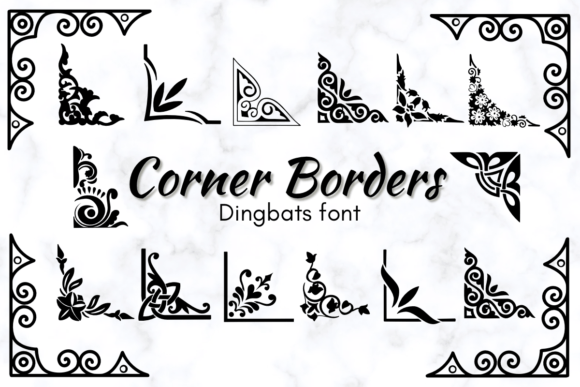
Corner Borders isn’t just another decorative font—it’s a hand-drawn toolkit of ornamental elements designed to add warmth, personality, and intentionality to your designs. As a dingbats font with a distinctly sketched theme style, Corner Borders delivers expressive corners, frames, flourishes, and dividers that feel organic—not sterile or over-polished. Whether you're crafting a one-of-a-kind wedding invitation or designing a boutique logo, this font invites authenticity back into digital design.
What Makes Corner Borders Unique?
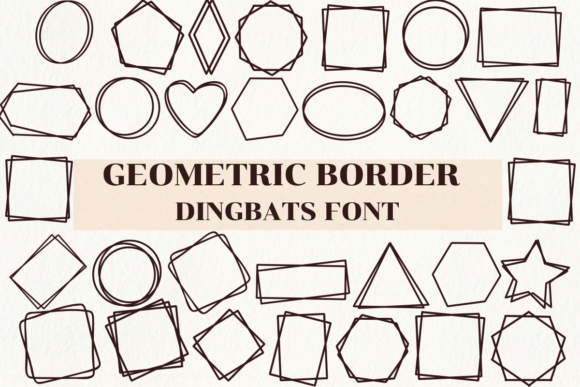
Unlike standard typefaces built for readability, Corner Borders is purpose-built for visual punctuation. Its glyphs are hand-sketched illustrations—think inked corners, delicate vines, geometric brackets, rustic borders, and whimsical corner motifs—all mapped to your keyboard. Each character is intentionally imperfect: slight line variations, subtle tapering, and gentle asymmetry give the collection its artisanal charm.
Because it’s a dingbats font, Corner Borders doesn’t replace letters or numbers. Instead, it works alongside them—enhancing layouts without competing for attention. You type a letter “A” from your main font, then insert a Corner Borders glyph as a frame around it. Or use repeated corner elements to build custom borders for social media posts, printable planners, or packaging labels.
Who Benefits Most from Corner Borders?
Corner Borders serves a wide range of creators—both hobbyists and professionals—who value tactile aesthetics in digital work:
- Wedding & Event Planners: Use Corner Borders to craft elegant, hand-finished invitations, seating charts, and ceremony programs—no graphic designer required.
- DIY Enthusiasts & Crafters: Print and cut border elements for scrapbooking, handmade cards, or framed wall art. The sketchy texture translates beautifully to vinyl cutting and laser engraving.
- Small Business Owners: Elevate product labels, café chalkboard menus, or local shop signage with custom corner accents that reflect brand warmth and care.
- Graphic Designers & Brand Strategists: Integrate Corner Borders as a supporting visual language—adding subtle framing to logos, app UI elements, or presentation decks where polish meets personality.
- Educators & Content Creators: Design engaging worksheets, classroom posters, or Instagram carousels with hand-drawn dividers that improve visual hierarchy and retention.
Real-World Uses You Can Try Today
You don’t need advanced software to get started with Corner Borders. Here’s how it fits naturally into everyday creative workflows:
- Invitation Suites: Frame your couple’s names with matching top-left and bottom-right corner glyphs—then mirror them on the RSVP card for cohesion.
- Social Media Graphics: Build a custom Instagram Story border using four Corner Borders glyphs (top-left, top-right, bottom-left, bottom-right) + straight-line elements to form a cohesive frame.
- Printable Planners: Add sketched section dividers between monthly calendars and habit trackers—giving structure without rigidity.
- Logo Accents: Place a minimal corner flourish beneath a wordmark to suggest craftsmanship or heritage—ideal for artisanal bakeries, ceramic studios, or indie bookshops.
- Packaging Details: Emboss or foil-stamp a Corner Borders motif onto kraft paper gift boxes or tea labels for instant tactile appeal.
Strengths That Set Corner Borders Apart
Its value lies not in complexity—but in thoughtful simplicity:
- Consistent Yet Human: Every glyph shares the same sketch aesthetic, so mixing elements feels intentional—not accidental.
- Lightweight & Compatible: Works across platforms (Mac, Windows, web apps like Canva and Adobe Express) and supports OpenType features for easy access.
- No Licensing Surprises: Includes personal and commercial licenses—so whether you’re selling 10 handmade candles or launching a global Shopify store, you’re covered.
- Print-Ready Clarity: Designed at high resolution, Corner Borders maintains crisp detail even when scaled large for banners or reduced for business card corners.
Things to Keep in Mind
Like any specialized tool, Corner Borders shines brightest when used with intention—not excess. Consider these practical notes:
- Not a replacement for typography: It doesn’t contain letters, numbers, or punctuation. Think of it as your design’s “accent cabinet”—not its foundation.
- Best paired with clean, legible fonts: Contrast is key. Pair Corner Borders with sans-serifs (like Montserrat or Inter) or soft serifs (like Playfair Display) to let both elements breathe.
- Subtlety often wins: One well-placed corner element can anchor a layout more effectively than four crowded ones. Less truly is more.
- Preview before printing: While optimized for output, always test print a small section—especially if using textured paper or specialty finishes—to ensure line weight reads as intended.
How to Evaluate If Corner Borders Fits Your Project
Ask yourself these three questions before downloading or licensing:
- Does my project benefit from hand-crafted warmth? If your goal is clinical precision or corporate minimalism, Corner Borders may feel out of place. But if “approachable,” “thoughtful,” or “handmade” are part of your brand voice—yes, it’s likely a match.
- Do I need flexible, reusable border elements—not just static images? Corner Borders gives you live, scalable, editable glyphs. No need to resize PNGs or wrestle with vector paths.
- Am I comfortable using fonts as design assets? If you’ve ever used symbols like ♥ or ✦ in text, you already understand the concept. Corner Borders extends that idea with richer, more expressive options.
Final Thoughts: Where Function Meets Feeling
In an age of algorithm-driven templates and AI-generated visuals, Corner Borders stands out by honoring human gesture—the slight wobble of a pen line, the quiet confidence of a confident sketch. It doesn’t automate creativity; it empowers it. You choose where the flourish goes. You decide how much space it occupies. You determine whether it whispers or sings.
That level of control matters—whether you’re a parent designing their child’s birthday banner, a freelancer building a client’s brand identity, or a teacher preparing next week’s lesson handouts. Corner Borders doesn’t ask you to become a calligrapher or illustrator. It simply gives you the tools to make something feel more like you.
If your creative process values authenticity over automation—and if your projects thrive on thoughtful details rather than flashy effects—Corner Borders is more than a font. It’s a quiet collaborator in every design decision you make.