Fall Clip: The Festive Autumn Font That Brings Warmth to Every Project
When the air turns crisp, leaves shift to amber and rust, and cozy gatherings begin to fill our calendars, creativity naturally leans into the season. Enter Fall Clip — a delightfully festive font designed with autumn in mind, crafted not just for aesthetics but for real-world making. Whether you're handcrafting personalized gifts, designing seasonal shop banners, or prepping sublimation blanks for fall markets, Fall Clip offers charm, clarity, and compatibility where it matters most.
What Makes Fall Clip Stand Out?
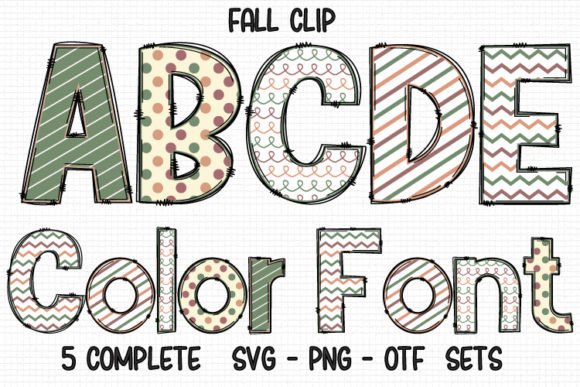
Fall Clip isn’t just another seasonal typeface — it’s a thoughtfully built tool that balances whimsy and function. Its letterforms feature gentle curves, subtle leaf-inspired flourishes, and a hand-drawn warmth that feels inviting without sacrificing readability. The font comes in two distinct versions: a versatile black (outline) version and a vibrant color version — each serving different creative workflows.
The black version is optimized for cutting machines. It works seamlessly in Cricut Design Space, Silhouette Studio, Sure Cuts A Lot, and other vector-based platforms. Because it’s built as a clean, single-line outline, it cuts cleanly on vinyl, heat transfer, cardstock, and more — perfect for stencils, iron-on designs, and layered paper crafts.
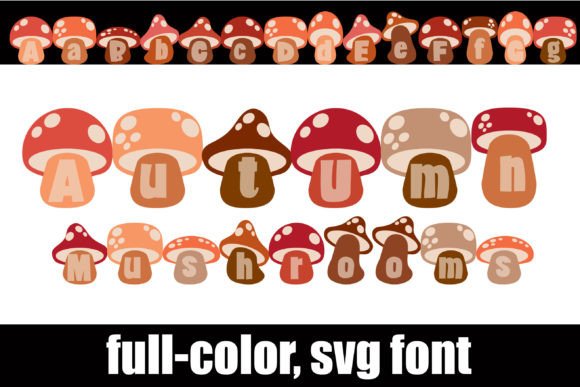
The color version, meanwhile, delivers rich, ready-to-use autumnal hues — think burnt orange, deep maroon, golden yellow, and forest green — all embedded directly into the glyphs. This version shines in digital design environments like Adobe Photoshop, Illustrator, Silhouette Studio (with advanced features), and Inkscape. But here’s the key detail: the color version is not compatible with Cricut Design Space. Its OTF/TTF files contain multi-layered color data that Cricut’s engine can’t interpret — so while it looks stunning on screen or in print, it won’t cut or weld properly on Cricut machines.
Who Benefits Most From Fall Clip?
Fall Clip serves a surprisingly wide range of users — from hobbyists to small business owners — thanks to its dual-format flexibility and seasonal relevance:
- Home crafters who personalize mugs, tumblers, and ceramic coasters using sublimation or epoxy techniques;
- Small-batch makers selling handmade goods at local fairs or online shops — especially those creating monogrammed pumpkin signs, “Hello Fall” banners, or custom sweater graphics;
- Teachers and parents designing classroom decorations, themed lesson materials, or printable activity sheets;
- Local businesses updating storefront signage, social media graphics, or seasonal menu boards with cohesive, on-brand autumn styling;
- Design professionals building client-facing assets — like event invites, packaging mockups, or Shopify banner headers — where seasonal tone matters.
Real-World Uses You Can Start Today
Let’s move beyond theory and into action. Here are tangible ways people are already using Fall Clip — with measurable results:
- Monogrammed Fall Mugs: Pair the black version with a Cricut Joy or Explore Air 2 to cut heat-transfer vinyl for ceramic mugs. Add a simple initial + “<3 Fall” for instant gift appeal — no design expertise needed.
- Sublimation Tumbler Designs: Use the color version in Photoshop to layer text over rustic wood textures, then print and press onto 20 oz tumblers. The built-in shading adds depth without extra shadows or gradients.
- Seasonal Banner Kits: Combine letters from Fall Clip with coordinating SVG foliage elements to build printable banner kits sold on Etsy. Customers love fonts that “just work” with their existing tools.
- Social Media Story Graphics: Drop the color version into Canva (via upload) to create eye-catching Instagram Stories for pumpkin patch promotions or apple cider specials — no need to manually recolor each letter.
- Classroom Door Decor: Print large-scale letters on kraft paper, cut by hand or machine, and arrange them into phrases like “Welcome to Our Harvest Festival.” The friendly proportions hold up beautifully even at 12+ inches tall.
What to Keep in Mind Before You Download
While Fall Clip is highly functional, understanding its boundaries helps avoid frustration — especially if you’re new to font formats or hybrid design workflows.
First: Always match the version to your toolset. If your primary machine is a Cricut, start with the black version. Trying to force the color version into Design Space may result in missing characters, broken spacing, or failed uploads. Likewise, if you rely heavily on Photoshop for layered branding, the color version saves hours of manual coloring.
Second: Fall Clip is intentionally seasonal — which means it excels in context but may feel out of place outside autumn months. That’s by design. It’s not meant to replace your core brand font, but rather to complement it during key seasonal campaigns.
Third: Licensing matters. Most versions of Fall Clip allow personal and commercial use — including resale of physical items you make with it — but always verify the license terms included with your purchase. Some bundles restrict use in logo design or digital templates for resale, so double-check before launching a product line.
Getting Started: A Quick Compatibility Checklist
Before diving in, ask yourself these three questions:
- Do I cut with Cricut, Silhouette, or another home cutting machine? → Choose the black version.
- Do I design primarily in Photoshop, Illustrator, or Inkscape — and want ready-made color? → Choose the color version.
- Am I unsure which version suits my workflow? → Review the Ultimate Font Guide — it walks through installation steps, common errors, and troubleshooting tips specific to multi-format fonts like Fall Clip.
Why Fall Clip Fits Naturally Into Your Creative Routine
At its core, Fall Clip solves a quiet but persistent problem: the gap between seasonal inspiration and technical execution. Too often, crafters find gorgeous fonts online only to discover they won’t cut, won’t embed, or require complex workarounds. Fall Clip bridges that gap with intention — offering two clear paths forward, both rooted in real use cases.
It doesn’t try to be everything. It doesn’t overload with unnecessary weights or language support. Instead, it focuses on doing one thing exceptionally well: helping you express autumn — authentically, efficiently, and beautifully.
Whether you’re pressing your first batch of fall-themed shirts or refreshing your shop’s visual identity for the season, Fall Clip meets you where you are — with no steep learning curve, no hidden compatibility traps, and plenty of room for warmth, personality, and play.